E-mail is the 'flow' in the work flow of many people. Consequently,
one spends a lot of time searching for old e-mails, to dig up
some important piece of information. With people having tens of
thousands of e-mails (or more), this is becoming harder and
harder. How to find that one e-mail in an evergrowing haystack?
Enter mu. 'mu' is a set of command-line tools for
Linux/Unix that enable you to quickly find the e-mails you are looking
for, assuming that you store your e-mails in Maildirs (e-mail
directories).
how does it work?
First there is mu index which fills a database with
information about all your e-mails; this may take a couple of minutes
the first time you do it, but after that it's a lot faster.
$ mu index
It tries to pick reasonable defaults, but you can of course specify
your own options. You can run mu index periodically to keep
your database up-to-date.
After building the database, it's easy to search for messages. For example:
Starting with version 0.9, you can search for date ranges, message flags and
message priority as well:
Searches are case-insensitive as well as 'accent insensitive' (version 0.9
and up); so angStroM will match Ångström.
The way to express the searches may be a bit cryptic at first, but easy to
learn (in the author's biased opinion); the mu manpages discuss syntax and
usage. There is also the mu-easy man-page which contains a lot of
simple examples to get you going.
NOTE: while searching from the command-line is sometimes useful, mu is most
easily used when integrated with an e-mail program. The documentation includes
examples for integration with mutt and Wanderlust.
mu is Free Software (GPLv3), runs on
Unix/Linux-based systems, and uses the Xapian text indexing engine. Important: for mu to work,
your mails must be stored in a set of maildirs
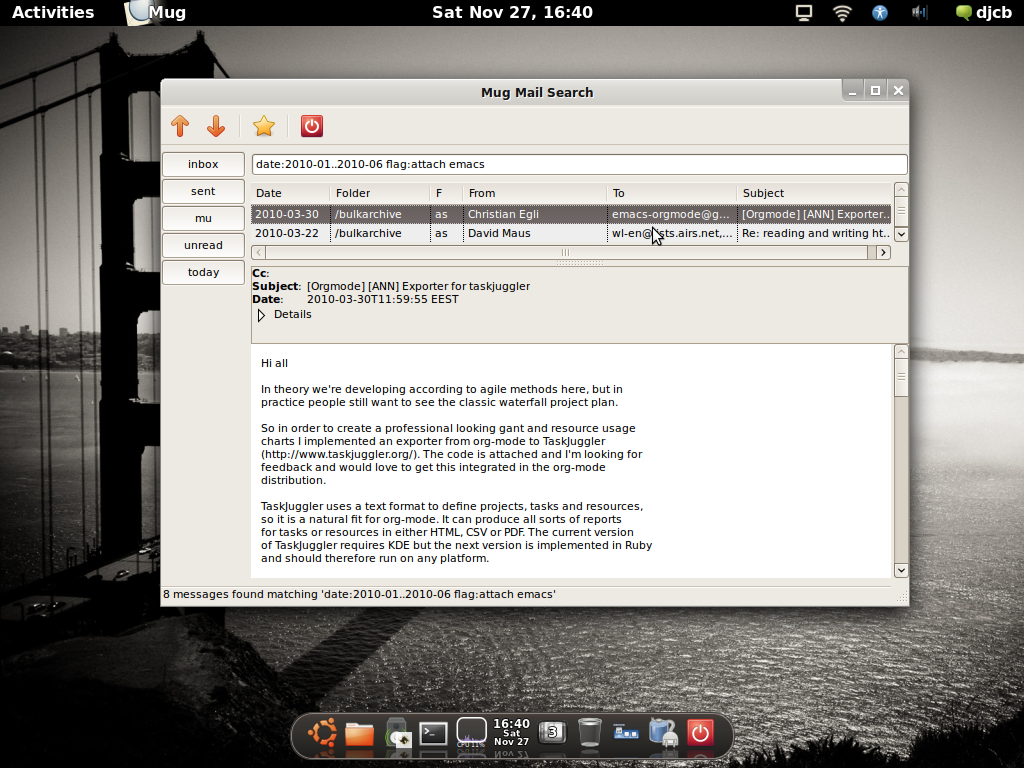
Starting with version 0.9, there is now a simple UI called mug. It
started as a little experiment, but it seems to be useful enough to
include. Usage should be straigthforward.
The longer-term goal is to have a bit more complete graphical user-interface;
for the time being, mug seems to work fine.
If you have defined bookmarks, mug will show them in the toolbar on the left
side of the mug-window, as can be seen in the screenshot.
mu find:
- search for sender and recipient; subject,message body text
- output to stdout, or as maildirs with links to the original messages
mu index:
- scan messages in recursive Maildirs, Maildir++ or separate files;
- only changed messages are considered when re-indexing;
You can download mu releases from their download page (Google
Code). mu is released under the terms of the GNU General Public
License (GPL), version 3 or later.
The mu source code is available in
Gitorious; get it from there:
$ git clone git://gitorious.org/mu/mu-ng.git
This is the source code for future versions of mu; there are branches and tags
for released versions. If you're not planning on getting involved in the
development of mu, it is recommended you use the actual releases. The git
version, in particular the 'master' branch, may break at times.
There is now also a mailing list available.
mu uses GMime
2.4 and Xapian; you'll need to
have those installed to build mu. On Debian/Ubuntu, the
following should get you all you need:
# apt-get install libxapian-dev libgmime-2.4-dev
(obviously, you also need the normal build tools;
gcc/g++, make and friends).
mu uses autotools, so building follows the normal
./configure/make pattern.
This should work without any problems at least on recent Debian/Ubuntu, for
both 32-bit and 64-bit architectures. If it does not work for your
distribution, please file
a bug with all the error messages, relevant information about your system
etc. that you got.
If you
think you have found a bug, or you have a good idea for a feature, please put
them in the issue list
(Google Code).
mu was designed and implemented by me, Dirk-Jan
C. Binnema, as a hobby project for my copious free time. It has no
relation to my employer.
You can send e-mail to djcb-at-djcbsoftware-dot-nl. |